Before installing Minecraft on your PC, it’s important to check whether your system meets the minimum or recommended requirements. While Minecraft is known for running on modest hardware, newer updates in 2026 include enhanced graphics, improved AI, and performance upgrades that require stronger components for optimal gameplay.
This guide covers official and practical system requirements for both Java and Bedrock editions on PC.
Does Minecraft Still Run on Low-End PCs in 2026?
Yes, but performance depends on the edition and graphics settings.
- Bedrock Edition is better optimized for lower-end systems.
- Java Edition requires slightly more resources, especially with mods or shaders installed.
For smooth gameplay in 2026, at least 8GB of RAM and a modern processor are recommended.
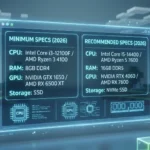
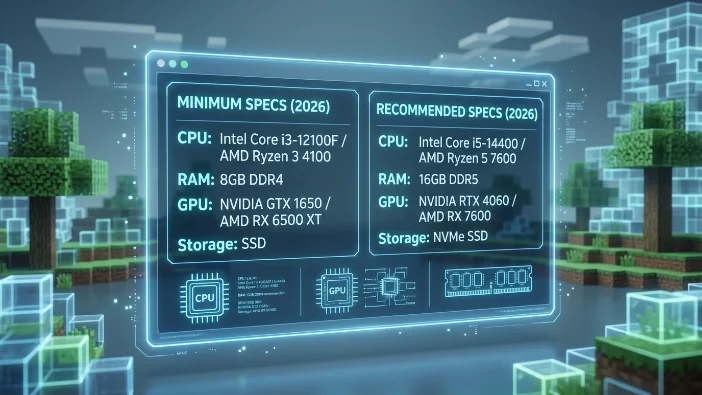
Minimum System Requirements (2026)
These specs allow Minecraft to run at basic settings with playable performance.
Minecraft Java Edition Minimum Requirements
- CPU: Intel Core i3 (10th Gen) or AMD Ryzen 3
- RAM: 8GB
- GPU: NVIDIA GTX 960 / AMD RX 560 or equivalent
- Storage: 4GB available space
- OS: Windows 10 (64-bit) or Windows 11
- Internet: Required for multiplayer
Minecraft Bedrock Edition Minimum Requirements
- CPU: Intel Core i3 or equivalent
- RAM: 8GB
- GPU: Integrated graphics supported (Intel UHD 620 or better)
- Storage: 2–4GB free space
- OS: Windows 10/11
Bedrock generally performs better on integrated graphics compared to Java Edition.
Recommended System Requirements (Best Performance)
For smooth 60+ FPS gameplay, faster chunk loading, and better render distance:
Java Edition Recommended Specs
- CPU: Intel Core i5 (12th Gen) or AMD Ryzen 5
- RAM: 16GB
- GPU: NVIDIA RTX 2060 or AMD RX 6600
- Storage: SSD (strongly recommended)
- OS: Windows 11
Bedrock Edition Recommended Specs
- CPU: Intel Core i5 or higher
- RAM: 16GB
- GPU: GTX 1660 or RTX-capable GPU (for ray tracing)
- SSD storage recommended
If you plan to use shaders or heavy mod packs, higher-end hardware is advised.
Ray Tracing Requirements (Bedrock Edition)Minecraft Bedrock Edition supports official RTX ray tracing on Windows 11.
To enable ray tracing:
- GPU: NVIDIA RTX 2060 or higher
- Latest GPU drivers installed
- Compatible RTX world or texture pack
Ray tracing significantly increases GPU demand, so lower-end cards may struggle.
How Much RAM Does Minecraft Use?
Java Edition:
- Default allocation: 2GB–4GB
- Recommended allocation (modded): 6GB–8GB
Bedrock Edition:
- Automatically optimized
- Generally uses less RAM than Java
If your system has 8GB total RAM, close background apps for better performance.
SSD vs HDD: Does It Matter?
Yes.
Installing Minecraft on an SSD provides:
- Faster world loading
- Reduced lag spikes
- Quicker chunk generation
- Faster launcher startup
While HDD works, SSD is strongly recommended in 2026.
Laptop vs Desktop Performance
Minecraft runs well on modern laptops if they meet requirements.
Gaming laptops with:
- Dedicated GPU
- 16GB RAM
- SSD storage
will handle Minecraft smoothly, including multiplayer and moderate shaders.
Budget laptops with integrated graphics may need lower render distance settings.
How to Check Your PC Specs on Windows 11
To check your system specs:
- Press Windows + I
- Go to System
- Click About
- Review CPU and RAM details
To check GPU:
- Open Task Manager
- Go to Performance tab
- Select GPU
Make sure drivers are updated via NVIDIA, AMD, or Intel official websites.
Common Performance Issues and Fixes
Low FPS Issues:
- Lower render distance
- Disable fancy graphics
- Update GPU drivers
- Allocate more RAM (Java Edition)
Game Crashes:
- Ensure Windows is updated
- Remove incompatible mods
- Reinstall the launcher
Overheating:
- Clean laptop vents
- Use cooling pad
- Close background apps
Is Minecraft More Demanding in 2026?
Compared to earlier versions, Minecraft now includes:
- Improved AI
- Enhanced lighting
- Larger world generation
- Multiplayer optimizations
While still accessible, newer updates benefit from modern CPUs and GPUs.
Frequently Asked Questions
Can Minecraft run on 4GB RAM?
It may launch, but 8GB RAM is recommended for stable performance.
Does Minecraft require a graphics card?
A dedicated GPU is not required, but it improves performance significantly.
Is Windows 11 better for Minecraft?
Yes. Windows 11 offers improved driver support and gaming optimization.
How much storage does Minecraft need?
The base game requires about 4GB, but worlds and mods can increase storage usage.
Final Verdict
Minecraft remains one of the most accessible PC games in 2026, but for smooth gameplay, especially with multiplayer or shaders, modern hardware is recommended.
Minimum setup: 8GB RAM, modern i3 processor, basic GPU
Best experience: 16GB RAM, SSD, mid-range GPU
Before purchasing or installing, always verify your PC meets at least the minimum system requirements for your chosen edition.